
I redesigned Mintpay’s core customer experience to help users understand what they could spend, navigate their financial information, and complete registration with less information to process at once. The work focused on three connected areas: dashboard clarity, a guided onboarding flow, and more readable interfaces across iOS and Android.
Role
Senior Product Designer
Collaboration
Product Manager, Head of Marketing, CEO, two Backend Developers, and Frontend team
Timeline
January–February 2024
Platform
Mobile app, iOS and Android

Helping customers understand their spending power and complete registration supports product activation and confident use. Support cost, conversion, and acquisition effects need supporting data before they can be presented as measured design impact.
Clearer spending information
The redesigned hierarchy prioritised the amount available to spend, while keeping the total approved limit accessible as secondary information.
A guided registration experience
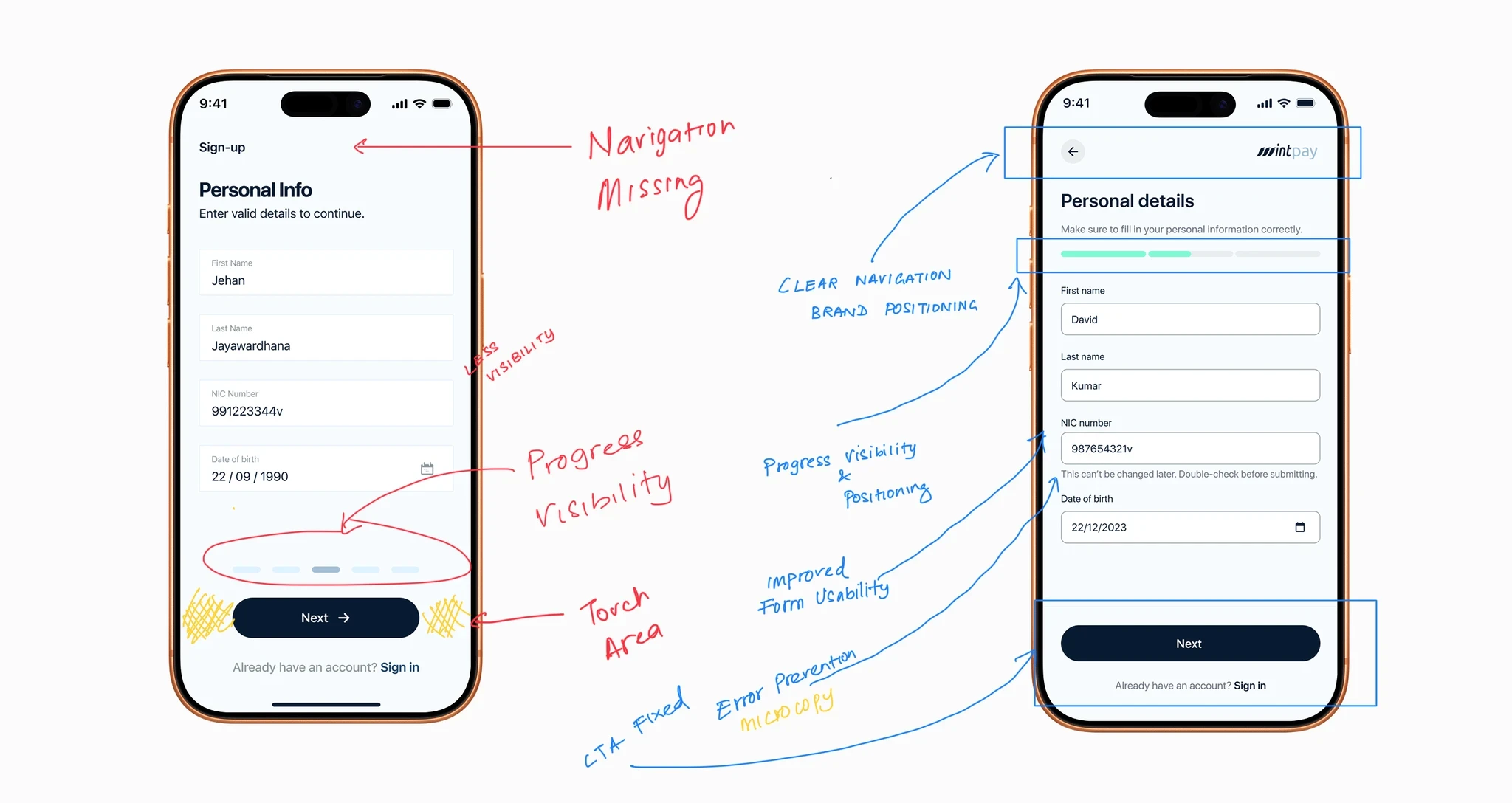
A four-step wizard replaced a long registration page, grouping the information users needed to provide into smaller stages.
Reported operational and activation benefits
The original account reports a reduction in balance-enquiry support tickets and increased sign-up completion. It also reports lower customer acquisition cost, although the measurement period, magnitude, and contribution of other changes are not documented.
Financial information required too much interpretation
Mintpay’s customer app needed to communicate several related financial figures. The key difficulty was helping customers distinguish their overall approved limit from the amount available for their immediate purchase. When those figures compete for attention, a customer has to interpret the interface before deciding whether they can proceed. In a retail checkout context, that uncertainty can make an already time-sensitive interaction harder. Registration presented a related problem. A long scrolling form exposed many requirements at once, making the process appear demanding before users had made progress. The design challenge was to improve both experiences: make the dashboard support an immediate spending decision and make onboarding easier to work through.
The original case study identifies checkout as an important context for the redesign. Customers needed financial information that could be understood quickly when preparing to pay.
That led to the guiding principle of glanceability: prioritise the figure that answers the customer’s immediate question, then provide access to supporting information.
The two-second comprehension target described in the original was a design ambition. No timed usability result is documented.
For onboarding, I applied the same principle to information density. Instead of showing the full registration task in one long view, the flow would reveal manageable groups of inputs as users progressed.

Prioritise available spending power over the total approved limit
Marketing favoured making the total approved limit the most prominent dashboard figure. I advocated for available spending power because it was more relevant to the customer’s immediate checkout decision. The resulting hierarchy gave “Available to Spend Now” the primary position and retained the total limit in a secondary card. This balanced the need to communicate the product’s overall spending facility with the need to help customers understand what was available at that moment.
Keep secondary information accessible through progressive disclosure
I restructured the dashboard using a swipeable carousel and bottom sheets. The primary view focused on essential information, while supporting details remained available when customers needed them. The intent was to reduce competing information without removing access to financial detail. Tabular figures reinforced this hierarchy by making amounts easier to align and scan.
Divide registration into four manageable stages & Design for readability across text sizes and viewing conditions
I replaced the long registration page with a four-step wizard. Grouping inputs into stages gave users a clearer sequence to follow. Micro-interactions provided feedback as each stage was completed. The design aimed to reduce the information presented at once and make progress visible. Whether it reduced abandonment at a particular step would require funnel data. I designed the dashboard to accommodate larger system font sizes and revised low-contrast secondary text. The original account describes an AA contrast target of 4.5:1 for normal text. These were specific accessibility improvements; a full WCAG conformance audit is not documented. The purpose was practical: customers should be able to read financial information across supported text settings and varied viewing conditions.

The redesign connected four parts of the customer experience:
- A dashboard hierarchy led by available spending power.
- A carousel and bottom sheets for secondary financial information.
- A four-step registration flow with progress feedback.
- Typography, contrast, and layout improvements for readability.
I worked with Product, Marketing, the CEO, and Engineering to align the information hierarchy and deliver the redesigned flows.
The project ran from January to February 2024. The original case study presents the redesign alongside operational and activation outcomes, but does not describe the release sequence or validation methods in detail.
The case study reports fewer balance-related support enquiries, improved sign-up completion, lower acquisition cost, and positive app-store feedback. It does not include baseline figures, a comparison period, a research sample, or a method for isolating the redesign’s effect.
Those outcomes should be treated as qualitative project reporting until supporting evidence is available.
The following reflections are proposed for your review.
Financial hierarchy should follow the customer’s decision
The most prominent number should help customers answer the question they are facing. In this experience, available spending power was more useful at checkout than the overall approved limit.
Progressive disclosure needs to preserve access to detail
Reducing information in the primary view can help customers focus, while secondary surfaces provide the explanation they need to understand their finances.
Onboarding clarity includes both inputs and progress
Breaking a form into stages is most useful when each stage has a clear purpose and users can understand how far they have progressed.
Let's work together
Good products rarely need more complexity.
They usually need someone willing to understand the problem deeply enough to remove it.
If you’re building something ambitious and need a senior designer who can move between product thinking, interaction, craft and delivery, I’d love to talk.
Based in Melbourne, Australia
Full Australian working rights
Open to senior product design opportunities and selected contract work.

